
What is Device2Device?
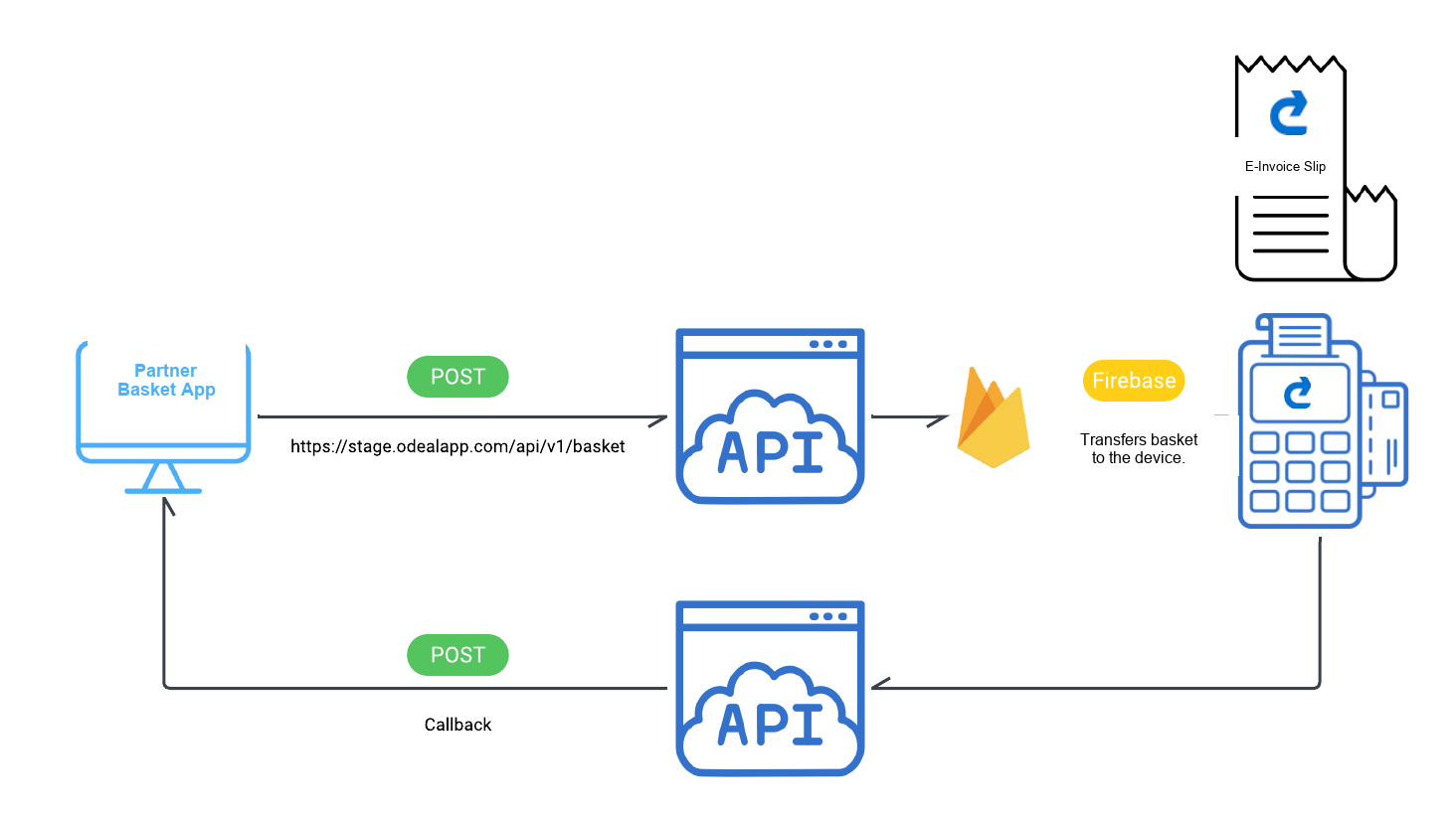
Device2Device (D2D) is an integration profile in which the partner's device is identified to the Ödeal POS device. The basket is created on the partner's device, sent to the Ödeal device, and the payment is completed on the Ödeal application side.
How Does It Work?
1. Creating and Sending the Basket
The partner's device creates a basket containing the information required for payment.
PREREQUISITE
Beforehand, a device code must be assigned to the device from the My Devices menu in the Ödeal Stage application on the Ödeal POS device.
Sending the Basket:
- The basket is sent to the Ödeal server via the API
- The basket includes a matching key belonging to the POS device
- This key is the device code assigned to the device from the My Devices menu
- It is sent in the
externalDeviceKeyfield of the basket request - This ensures the basket and device are matched
2. Basket Receipt and Communication with the POS Device
- The Ödeal server receives and processes the sent basket
- Following this, the Ödeal POS device wakes up automatically
- The basket becomes visible to the user
3. Payment and Invoice Creation
- The payment is completed by the Ödeal application
- Once the payment is completed, an E-Invoice or E-Archive Invoice is automatically created by Ödeal, as appropriate for the recipient
Defining Callback URLs
What is a Callback URL?
The partner defines specific callback URLs related to payment and invoice transactions. These URLs are used to relay information to the partner's system.
CALLBACK REGISTRATION
The defined URLs are submitted to Ödeal via the configuration method, and Ödeal registers these URLs in its own system.
Callback URL Types
Payment Succeeded URL
Information is sent to this URL when a payment is completed successfully. When Ödeal receives a successful result from the payment transaction, it uses this URL to deliver the necessary notifications to the partner's application.
Payment Cancelled URL
If the payment transaction was completed successfully and the payment is subsequently cancelled from the device, cancellation information is sent via this URL. In other words, the partner receives this information when the payment is cancelled.
Payment Failed URL
When the payment transaction fails due to an error, error information is relayed via this URL. The partner accesses information about the failed payment through this URL.
E-Invoice Created URL
If the payment is completed successfully, an e-invoice is automatically created by Ödeal, and invoice information is relayed to the partner via this URL.
E-Invoice Cancelled URL
If an invoice is cancelled, invoice cancellation information is sent to the partner via this URL.
Summary
THE ROLE OF CALLBACK URLS
Callback URLs are used to relay every kind of status related to payment and invoice transactions to the partner's system:
- Successful payments
- Failed payments
- Cancellations
- Invoice creation
- Invoice cancellation
By defining these URLs and submitting them to Ödeal, the partner can track payment processes and take the necessary actions.